Meeting - Video Meeting
- 4.2
- Rating
- 500.00K
- Installs
- Free
- Price

 Analysis by App-foxy
Joining a video call should be simple, but in practice it often becomes a small chain of delays: finding the right meeting tool, opening a browser, checking whether the microphone is active, and helping someone else get connected. Meeting - Video Meeting is aimed at that exact annoyance. It is a free business app from Techno Hub Inc for hosting video conferences, online meetings, and video calls from an Android device. After spending time with it, I see its main value less as a feature-packed office suite and more as a straightforward way to get a conversation started without turning every appointment into a technical task.
That focus is useful for people who regularly move between home, work, classrooms, client calls, or informal team discussions. The app has reached over 500 thousand installs and holds a 4.2 average from around 600 ratings, which suggests that its basic approach is working for a meaningful group of users. I would still treat those figures as a sign of interest rather than proof that it will replace every established meeting platform. Its appeal depends on whether you want a dedicated meeting utility or a broader collaboration system with calendars, file storage, chat, and administration built in.
Why a simple meeting app can save more time than expected
The recurring problem with online meetings is rarely the conversation itself. It is the preparation around it. A participant may receive an invitation in one app, open it on a phone, be redirected somewhere else, and then spend the first few minutes checking audio or explaining how to enter. A host has an even bigger burden: creating the session, sharing access details, waiting for people to arrive, and keeping the call usable when everyone has different devices and connection habits.
You May Also Like

 Blood Strike: 2.5 Anniversary
Blood Strike’s Loadouts Turn Every Drop Into a Tactical Gamble
A close look at Blood Strike’s custom loadouts: how fast access to signature weapons reshapes its battle royale rhythm, rewards preparation, and narrows the gap between fights.

 Pandora - Music & Podcasts
Pandora’s Music Is Easy to Start, but Harder to Recover
Pandora’s strength is its low-effort path from a seed to a station. Its weak spot is how much confidence it asks you to place in connection, setup, and quiet recovery.

 8 Ball Pool
 Is Built on Rivalries, Rematches, and Routine
A close look at the rivalries, rematches, shared routines, and unanswered safety questions that turn a quick pool match into a persistent mobile community.

 Samsung Music
’s Quiet Strength Is Playing What You Already Own
Its reach comes less from spectacle than from dependable access to a personal library. That simplicity is both the app’s strongest retention engine and its ceiling.

 AccuWeather: Weather Radar
AccuWeather Review: A Quick, Clear Forecast for Everyday Decisions
For everyday plans, the best forecast is the one you can understand quickly. AccuWeather makes rain timing, radar, and local conditions easy to act on, with a few trade-offs.

 Hill Climb Racing
Why Hill Climb Racing Still Turns Crashes Into One More Run
A tiny car, a bumpy hill and one more upgrade: Hill Climb Racing keeps resurfacing because its simple chaos makes every near-miss feel personal.
More From Our News Desk



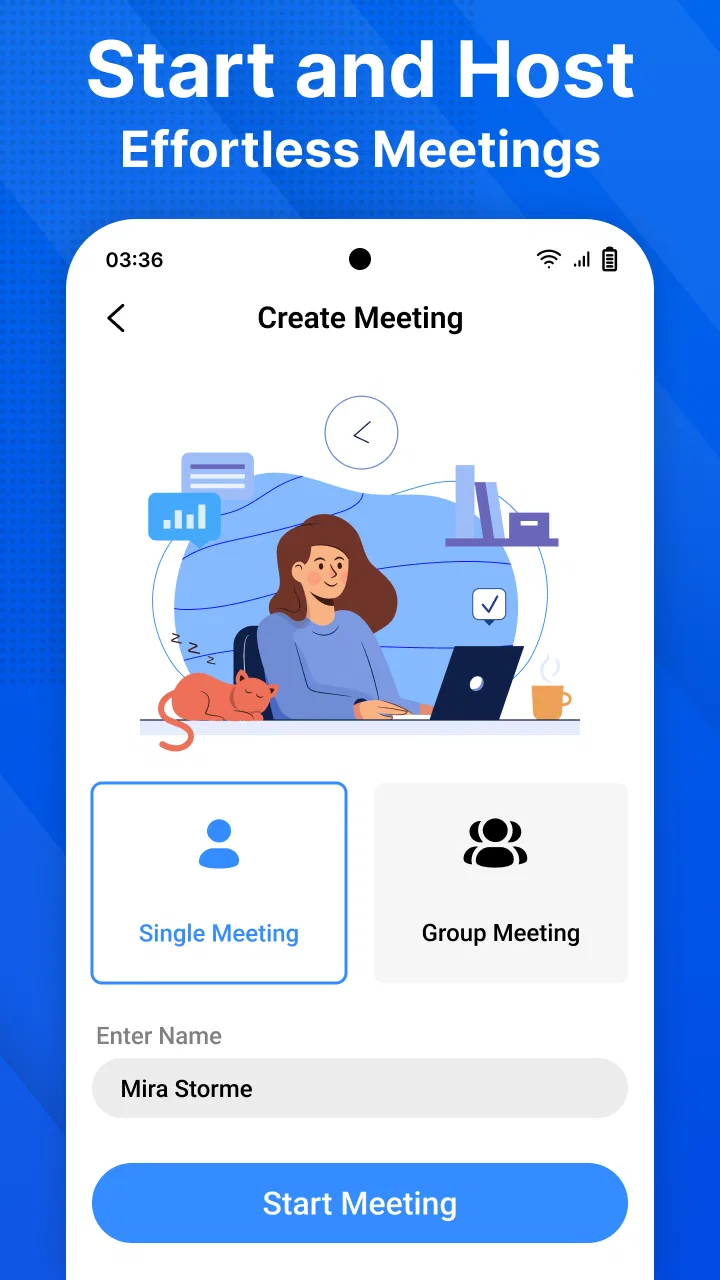
Meeting - Video Meeting addresses that problem with a deliberately narrow identity. The store short description is simply “Meeting,” and that is a fair indication of the experience: the app is centered on getting into an online meeting rather than surrounding the call with a large collection of unrelated tools. I appreciate that direction because it makes the product easier to understand. You do not need to learn a project-management system before using it for a quick discussion.
In my experience, this kind of app is most valuable when the meeting is important but not complicated. A freelancer checking a draft with a client, a small business owner speaking with a supplier, or a remote team holding a short daily check-in can benefit from a direct route into the call. The time saved comes from reducing decisions. You are not choosing between multiple communication modes; you are opening the meeting app and concentrating on the people in front of you.
That simplicity also sets a boundary. If your organization needs a complete record of conversations, integrated scheduling, detailed participant controls, or a shared workspace for documents, a larger business platform may be a better fit. Meeting - Video Meeting makes more sense as the meeting layer itself. I would not choose it solely because it is free if your work depends on advanced administration or a tightly connected office ecosystem.
The first setup: keep the first call deliberately small
The best way to judge this app is not by creating a large formal event immediately. I recommend starting with a short test call involving one other person. That lets you check the practical details that affect every later meeting: whether your phone is positioned comfortably, whether the microphone picks up your voice clearly, and whether the other participant can enter without help. A small trial also exposes any confusion in the joining process before a client or colleague is waiting.
Because the app runs on Android 8.0 and later, it is available to people using a reasonably broad range of devices. That is helpful for mixed teams where not everyone upgrades phones at the same time. Still, operating-system compatibility is only the starting point. Video calls also depend on the phone’s camera, microphone, battery condition, and network quality. I would prepare the device before an important call rather than assuming that the app alone can solve every problem.
My practical setup routine is simple. I place the phone at eye level instead of holding it in my hand, use a stable connection, close unrelated apps, and make sure the room is bright from the front rather than behind me. These are ordinary steps, but they matter more than decorative meeting features. A stable image and understandable voice make a short call feel professional, while a badly placed phone can make even a good app seem unreliable.
For hosts, I would also prepare the meeting details in advance and send them in one clear message. Avoid scattering the access information across several chats or asking people to search through an old conversation. The app can remove some joining friction, but the organizer still controls how easy the invitation is to understand. A short message with the meeting purpose, expected start time, and joining instructions is more useful than a vague “call me later.”
One useful habit is to separate the technical test from the real discussion. Start the call a little early, confirm that audio works, and then use the remaining time to review the points you actually need to cover. This prevents the common mistake of using the first part of a client conversation as an improvised equipment check. The app is at its best when the human preparation around it is equally uncomplicated.
Where it fits into an ordinary working day
Imagine a small online shop owner who needs to speak with a designer about a product page. The owner is away from a desk, has a phone nearby, and does not need a presentation deck or a long chain of messages. A focused video meeting can settle the visual changes faster than exchanging several rounds of text. The owner can show the current problem, hear the designer’s response, and leave with a clear next step.
That is the sort of situation where I find a dedicated meeting app convincing. It turns a conversation that might otherwise be delayed into something immediate. The benefit is not that the call becomes more sophisticated; it is that the distance between “we should discuss this” and “we are discussing it” becomes shorter.
It can also suit recurring internal check-ins. A small team may want a quick face-to-face conversation at the beginning of the day without opening a full collaboration suite. In that setting, the important qualities are predictable access and a low learning curve. People should spend their energy on priorities, not on deciding which part of a complicated platform they need to use.
Another reasonable use is support between a business and a customer who prefers speaking rather than typing. A video conversation can clarify a problem that would be difficult to describe in messages. However, I would use good judgment about what is shown on camera. Before sharing a screen or pointing the phone at paperwork, remove unrelated personal or business information from view. Convenience should not lead to careless exposure of sensitive material.
For education or community groups, the app may be useful when the goal is a live conversation rather than a full learning environment. A tutor can speak with a student, or a volunteer group can coordinate a small activity. The limitation is that a meeting tool should not automatically be treated as a replacement for a classroom system. If you need assignments, structured lessons, or a searchable knowledge base, you will likely need another service alongside it.
Small workflow choices that make the experience better
The first non-obvious lesson is to treat the phone as a meeting device, not just a backup screen. A phone is easy to carry, but its mobility can become a weakness if it is held throughout the call. I get a better result by placing it on a stable surface and avoiding movement. That reduces distracting camera shifts and leaves my hands free to take notes or handle documents off camera.
The second is to decide in advance whether the call is mainly for listening, explaining, or showing. If I am listening, I position the phone for a clear view and minimize background activity. If I am explaining, I keep notes close to the camera so I do not constantly look away. If I am showing a physical item, I test the angle before the other person joins. This preparation is especially important on a small screen, where a quick change of position can make the subject hard to see.
The third is to use a short agenda even for informal calls. This is not a feature claim about the app; it is a workflow that protects the time the app is meant to save. I usually write down the decision needed, the information to share, and the person responsible for the next action. A focused call then ends with something concrete instead of becoming another open-ended conversation.
A fourth useful trade-off concerns meeting size. A small group is easier to manage on a phone than a large discussion where several people speak at once. If the call involves many participants, I would appoint someone to guide the conversation and ask people to introduce themselves when they speak. That is not a substitute for advanced moderation controls, but it prevents a basic meeting from becoming noisy and confusing.
Finally, I would keep a backup communication method available for important work. If a participant has trouble joining, a phone call or written message can prevent the entire appointment from collapsing. This is not a criticism unique to Meeting - Video Meeting; every internet meeting tool depends on conditions outside the app. The practical point is that reliability includes having a fallback, not merely trusting one button.
What friction it removes, and what it does not
The strongest part of the experience is the clarity of purpose. Meeting - Video Meeting is categorized as a business app, but it does not force the user to think like an administrator before arranging a conversation. That makes it approachable for independent workers and small teams that need video communication without adopting a large business package.
Its free price is another meaningful advantage for casual use and small organizations watching expenses. There is no purchase decision standing between a user and a trial. The Everyone content rating also makes the app broadly approachable for general communication, although adults remain responsible for choosing appropriate meeting practices when children or students are involved.
The developer, Techno Hub Inc, has kept the product’s identity easy to understand. I also noticed that the current version is 2.9, so users are not dealing with an abandoned-looking first release. It was released on October 26, 2024, and that recent starting point helps explain why I would approach it as a developing utility rather than a mature replacement for every established video-conferencing service.
The main friction that remains is the friction common to mobile meetings. A phone screen gives less room for seeing several faces, reading shared material, or checking notes at the same time. Battery use can also become a practical concern during longer calls, and a weak connection can affect the conversation regardless of the app’s interface. For a brief call, these compromises are acceptable. For a long workshop, presentation, or meeting with extensive visual material, a larger screen and a more specialized platform may be more comfortable.
I would also be cautious about choosing it when your work depends on a complete history of decisions. A simple meeting app can help people talk, but talking is not the same as documenting. If your team needs searchable transcripts, formal attendance records, integrated calendars, or a permanent project trail, check whether your existing business tools already handle those needs more effectively. In that case, using the meeting function inside your current suite may save more time than introducing another app.
Who should use it and who should look elsewhere
I recommend Meeting - Video Meeting to someone who wants a direct, free way to host or join online conversations from an Android phone. It is particularly suitable for freelancers, small businesses, remote pairs, informal teams, and people who find full collaboration platforms unnecessarily heavy. The app’s greatest strength is not a long feature checklist; it is the way its narrow purpose can make a routine call feel less demanding.
I would be more hesitant to recommend it as the only communication system for a large company, a regulated workflow, or a team that already depends on a sophisticated office platform. Those users may value centralized management and connected productivity tools more than a lightweight meeting entry point. Likewise, someone who mainly wants text chat, file exchange, or project tracking should choose an app built around those tasks instead.
After using it, my verdict is positive but measured. Meeting - Video Meeting removes a familiar layer of delay: the hesitation and setup burden that often stand between deciding to talk and actually talking. It is free, accessible on Android 8.0 and later, and simple enough for everyday business conversations. I would keep the first meetings small, prepare the device, share clear joining instructions, and maintain a backup for important appointments.
My recommendation is to try it when your priority is time saved and fewer steps, not a complete office ecosystem. If that is the problem you are trying to solve, this app has a clear reason to exist. If your meetings require extensive controls, records, collaboration features, or presentation-heavy work, a broader alternative will probably justify its extra complexity. For quick, human conversations where getting connected is the main task, it is a practical option worth keeping on an Android phone.
FAQs for Meeting - Video Meeting
01What features does the Meeting app offer for video conferencing?
The Meeting app provides a range of features including high-definition video and audio, screen sharing, virtual backgrounds, and chat functionality. It also supports breakout rooms for smaller group discussions and integrates with popular calendar applications for easy scheduling and reminders.
02Is the Meeting app secure for hosting confidential meetings?
Yes, the Meeting app prioritizes security with end-to-end encryption and password-protected meetings. It includes options for waiting rooms and host controls to manage participant entry, ensuring that only invited attendees can join your meetings. Regular updates are also released to address any security vulnerabilities.
03How does the Meeting app perform on mobile devices?
The Meeting app is optimized for both Android and iOS devices, offering a seamless experience on smartphones and tablets. It maintains high performance with adaptive quality adjustments based on your network speed, ensuring smooth video and audio transmission even on the go.
04Are there any limitations on the free version of the Meeting app?
The free version of the Meeting app allows users to host meetings with limited duration and participant capacity. Typically, meetings can last up to 40 minutes with a maximum of 100 participants. For extended features such as longer meeting durations and larger participant limits, a subscription is required.
05How user-friendly is the interface of the Meeting app?
The Meeting app boasts an intuitive and user-friendly interface, making it easy for users of all tech levels to navigate. Setting up and joining meetings is straightforward, with clear on-screen instructions and support resources available. Users can quickly access features like screen sharing and chat with minimal effort.
Pros
- High-quality video calls with minimal lag.
- User-friendly interface for quick navigation.
- Supports multiple participants seamlessly.
- Cross-platform compatibility for Android and iOS.
- End-to-end encryption for secure meetings.
Cons
- Requires strong internet connection for best results.
- Limited features in free version.
- Occasional audio sync issues reported.
- No offline mode for past meetings access.
- In-app ads can be disruptive in free version.

Meeting - Video Meeting
Gallery